100% Free & Local Learning Tracker

Master Any Subject,
One Milestone at a Time.

Break down complex courses, bootcamps, or personal goals into achievable steps. Visualize your progress and stay consistent with an interactive, customizable tracker.

No Sign-up Required
Works Offline

Perfect for tracking learning paths from

See it in action

A Beautiful Interface
for Your Learning

Designed to be intuitive, distraction-free, and satisfying to use. Switch seamlessly between your dashboard overview and deep-dive modules.

Dashboard Overview
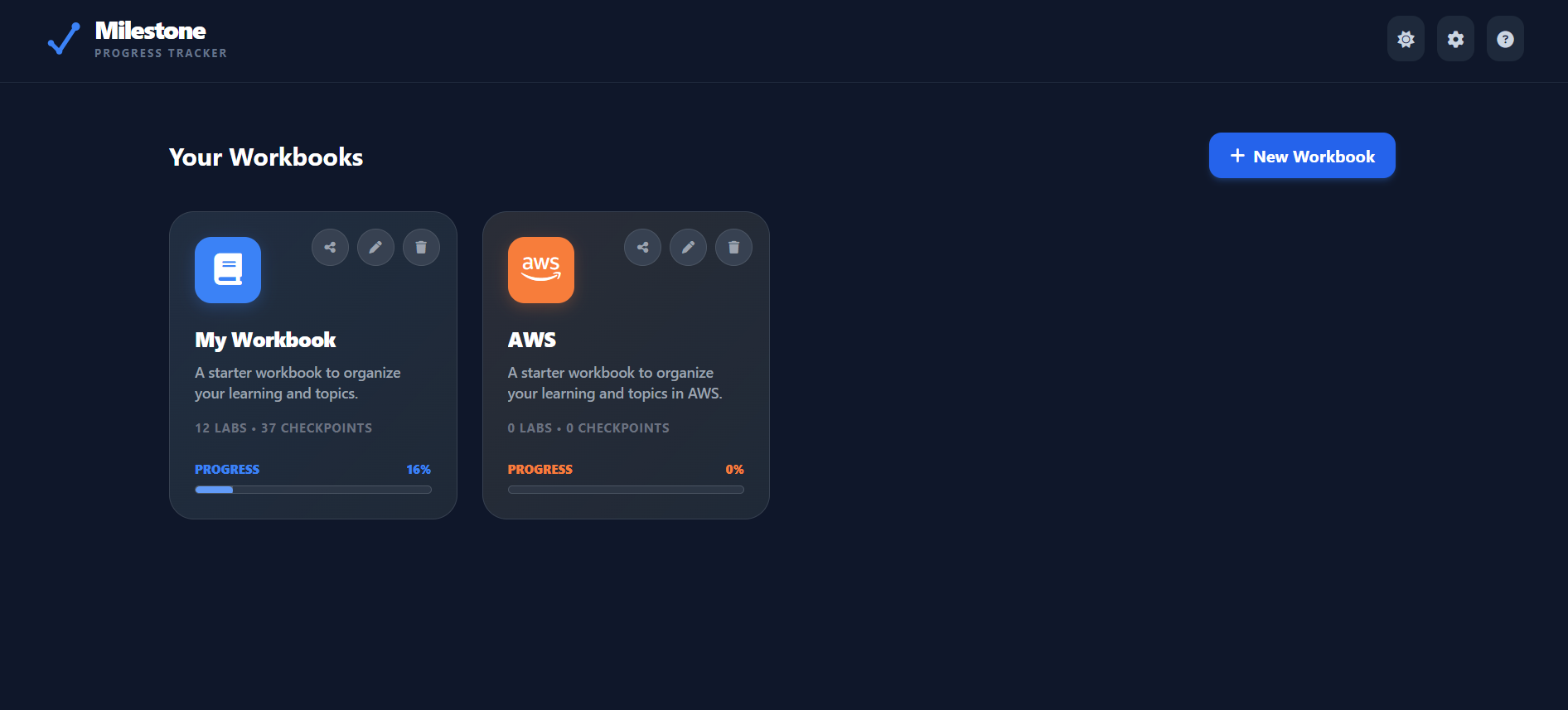
Milestone Dashboard View
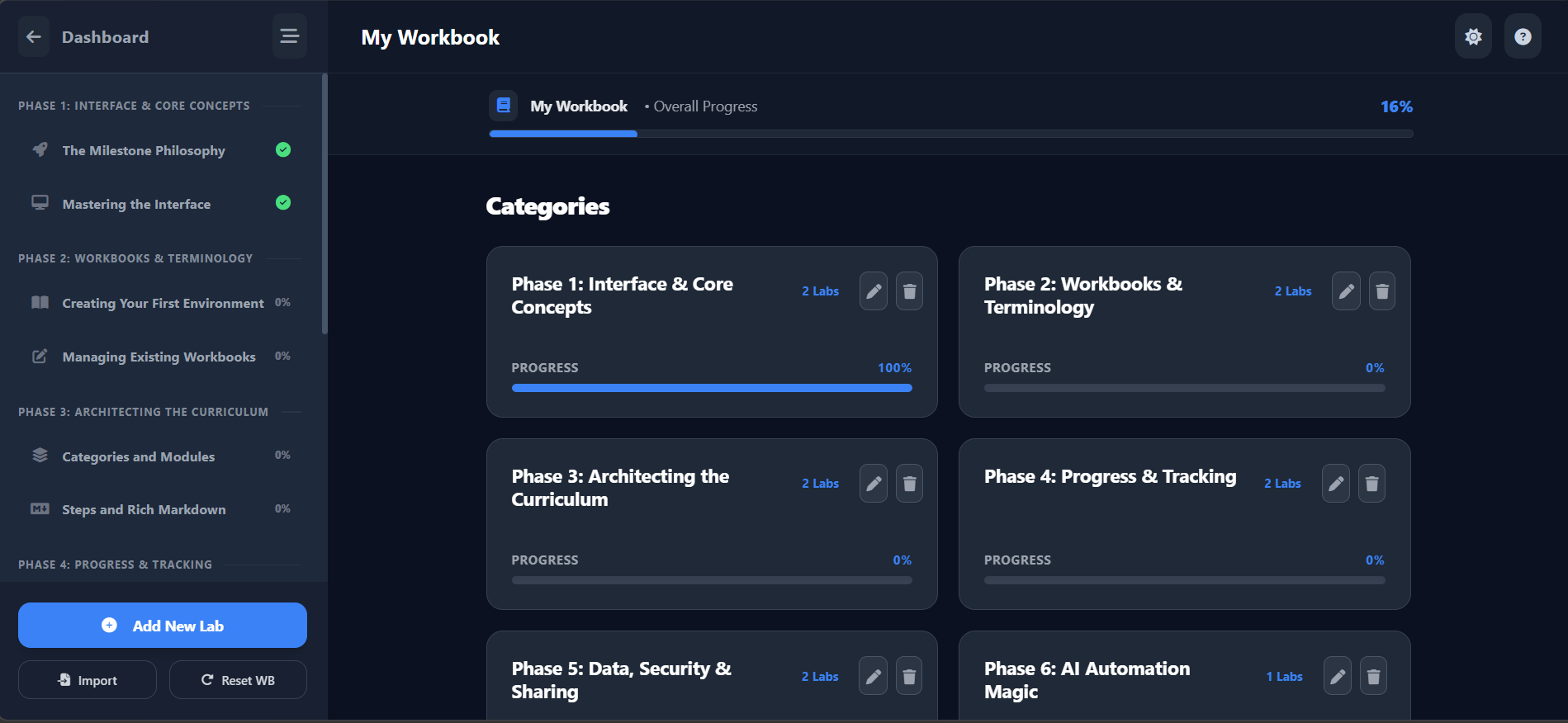
Interactive Workbook
Inside Workbook Content View
Rich Tracking Interface

Everything You Need

Powerful Features,
Simple Interface

Milestone is packed with tools designed specifically to keep you motivated and organized, no matter how complex the subject is.

Custom Workbooks

Create isolated environments for different subjects. Customize theme colors, icons, and even the terminology (e.g., call them "Labs" or "Chapters").

Granular Tracking

Break subjects into Categories, Modules, and actionable Checkpoints. Watch your progress bars fill up as you master each concept.

Rich Markdown Notes

Add rich text descriptions to any module or checkpoint. Format code snippets, links, and bold text natively using standard Markdown syntax.

Share & Collaborate

Generated a perfect study guide? Create secure, shareable links to let friends or students instantly import your workbook into their own app.

Local & Secure Data

Your data lives in your browser. Complete privacy. Need a backup? Export your entire state to JSON and restore it on any device.

Native Dark Mode

Late night study session? Toggle the beautiful dark mode for a sleek, eye-strain-free experience that automatically remembers your preference.

Workflow

How Milestone Works

We believe in chunking. By breaking down massive goals into micro-tasks, you create a psychological feedback loop of continuous accomplishment.

1

Create a Workbook

Name your subject, pick a color, and choose a FontAwesome icon. E.g., "Fullstack Web Development".

2

Map Your Journey

Add categories (e.g., "Frontend") and insert modules (e.g., "React Hooks"). Inside each module, list out exact checkpoints.

3

Check Off & Celebrate

As you complete tutorials or read documentation, tick the boxes. Watch the progress bar fill, keeping you motivated to the end.

Python Masterclass

Overall Progress

66%
Install Python & VS Code

Set up environment variables and extensions.

Variables & Data Types

Strings, Integers, Floats, and Booleans.

Control Flow (If/Else)

Learn conditional logic and boolean operations.

Who Uses Milestone?

Self-Taught Developers

Tracking 100-day coding challenges, YouTube tutorials, and massive Udemy courses without losing track of where they left off.

Educators & Content Creators

Building "Syllabus JSON files" to share with students via generated links, giving them an interactive way to follow the curriculum.

Language Learners

Structuring vocabulary lists, grammar modules, and daily practice routines into satisfying, checkable chunks.

Under the Hood

Powered by Modern Technology

Angular

Dynamic Frontend UI

Tailwind CSS

Modern Styling

Spring Boot

Robust Backend API

PostgreSQL

Reliable Database

Frequently Asked Questions

Is Milestone really free?
Yes! Milestone is completely free to use. All your data is stored locally in your browser's storage, meaning there are no server costs or subscriptions required.
What happens to my data if I clear my browser?
Because data is stored locally, clearing your browser cache/storage will delete your workbooks. We highly recommend using the Export All Data feature in the Global Settings to regularly back up your progress to a JSON file.
How does the sharing feature work?
When you click the "Share" button on a workbook, the app sends a copy of that workbook's structure to our secure backend and generates a unique URL. You can send this URL to anyone, and they will be able to load a copy of your workbook into their own Milestone dashboard. (Note: Progress checkboxes are reset for the new user!).
Can I use Milestone on my mobile phone?
Absolutely! Milestone is designed to be fully responsive. It works seamlessly as a mobile web app. You can even add it to your mobile home screen for a full native-like, full-screen experience.
How do I import a shared workbook or a JSON backup?
If someone sends you a share link, simply click it and the app will open the shared workbook automatically in "Shared View". From there, you can explore it or save it locally. For JSON files, open the Milestone app, click the Gear icon (Settings), and use the Import Data function to load your file.

Need Help?

Contact Support

Have a question that wasn't answered in the FAQ? Send us a message.

Ready to organize your learning?

Join thousands of learners tracking their progress effectively. No account required. Start instantly.

Open Milestone App